Observe
The application in front. The elapsed time. A separate session when the foreground changes.

GAMA TIMESCOPE / NATIVE MACOS
THE DAY, MADE VISIBLE.A developer’s question.
A little clarity for anyone
who spends a day at a Mac.

01 / The missing hours
A developer could spend the whole day at a computer and still struggle to describe it. Coding, research, messages, a break, another tab. The hours were real. Their shape was hard to see.
GAMA TimeScope started with that personal question. It grew into a way for anyone using a Mac to look back with a little more clarity.
Work. School. Research.
A message. A pause. A little play.
The same hours. Different meanings.
“I was at my desk all day. What did that day contain?”
A build, some research, an unexpected interruption, a return to the editor. The summary shows which applications were active. The timeline shows the sequence. You bring the meaning of the work.
Notice the pattern. Choose tomorrow deliberately.02 / Give the day a shape
Record foreground application sessions. Keep their start, end and duration. Then give the person two ways to read the day: a simple summary and the sequence behind it.
Optional website details add context where the browser permits it. The application remains the parent: looking deeper should never count the same minute twice.
Five foreground sessions.
Idle, pause and missing observations stay separate.
Choose an application to inspect its recorded context.
Two foreground sessions, 78 minutes in total. This example includes optional recorded website coverage. Those minutes are already part of Chrome’s total.
28 + 15 + 10 + 25 = 78 minutes.
More context. The same total.
Application time: foreground tracking uses public macOS APIs without an additional privacy permission.
Chrome and Safari websites: disabled by default. Choose Enable for each browser and approve its normal macOS Automation request. Page titles and YouTube identifiers are separate optional choices.
Current limits: Opera, Edge and Brave detailed adapters remain disabled; Firefox has no implemented native tab adapter. Generic app tracking remains available. Safari has no verified private-window indicator: disable its website details before private browsing.
A browser illustration of the reporting idea. Every number is fictional. This page cannot observe your applications, tabs or computer time.
One minute of computer time.
One place in the total.
03 / Quiet machinery
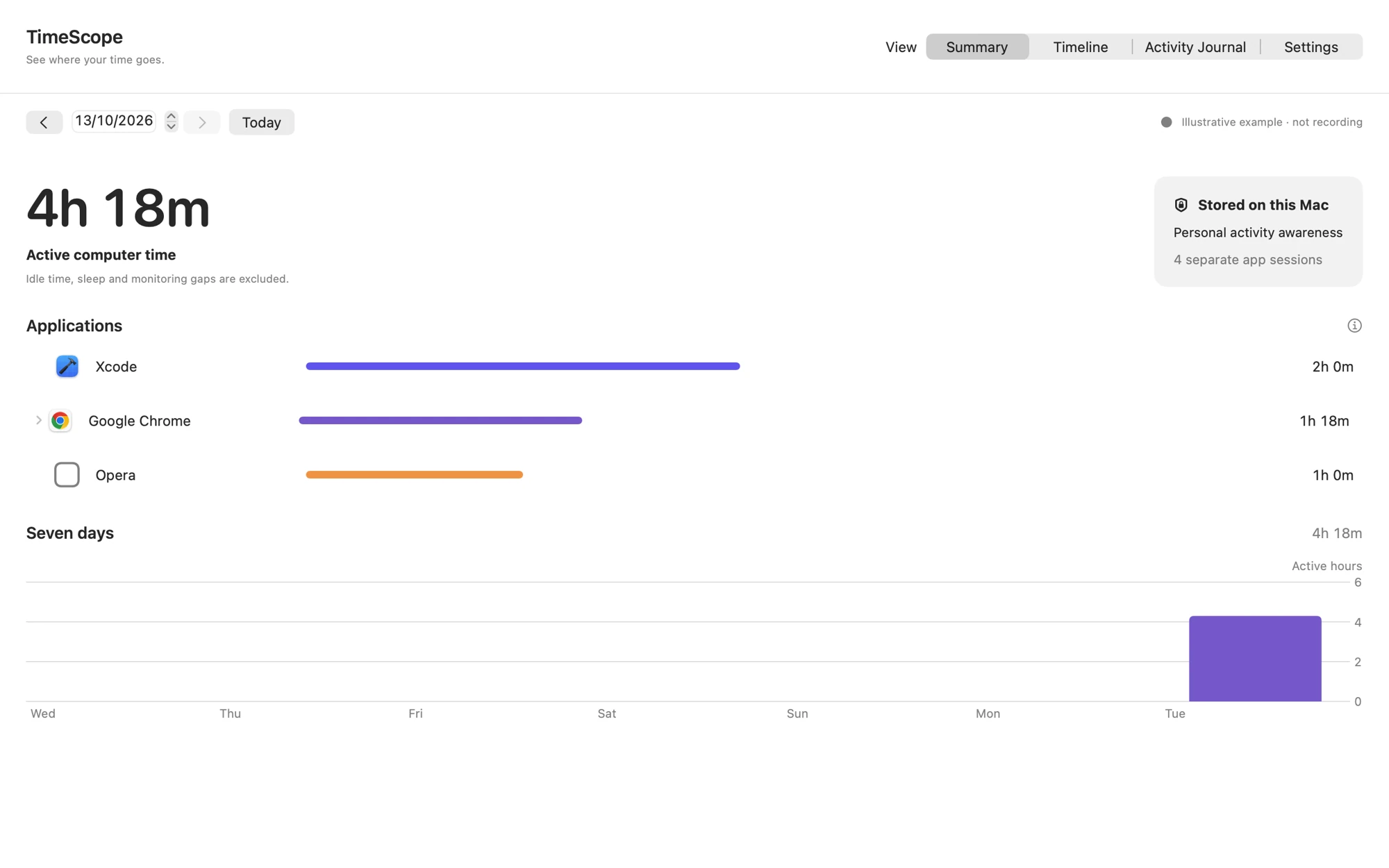
A native macOS application observes the foreground app and keeps local records. Daily summaries, a seven-day view, the Activity Timeline and Activity Journal make those records readable.
Recording begins when you choose Start recording. Browser details are a separate choice. No account or cloud service sits between you and your own day.
The application in front. The elapsed time. A separate session when the foreground changes.
Local SQLite records, transactional checkpoints and a journal of recording events.
A daily total, a seven-day view, a timeline and the context underneath.
A choice to begin, optional browser detail and visible controls for the person using the Mac.
THE ACTUAL NATIVE INTERFACE
These are the app’s native SwiftUI views, rendered with isolated synthetic examples. Explore the surfaces. Open any image to inspect the details.
 View full size ↗
Activity records stay on the Mac. No GAMA account, cloud sync, subscription, advertising or external app analytics. The app works offline; opening a support website is an ordinary web request.
04 / What time cannot prove
A page can be open while someone thinks, reads, walks away or talks to another person. A shared macOS account can belong to more than one human. Missing observations leave uncertainty.
TimeScope needed to preserve those limits. An interruption stays an interruption. Unclassified time stays unclassified. The record supports a conversation; it cannot finish it for you.
An application in front does not prove reading, watching or the quality of someone’s work.
An inferred interruption does not establish why recording stopped. Missing observations stay visible.
A shared macOS account cannot tell you which family member used the computer.
Website observations belong within their application. They do not add more minutes to the day.
The day can be measured.
Its meaning needs a person.
Website intervals are sampled foreground exposure and can miss quick tab changes. Passive viewing can become idle. Dedicated lock/unlock detection remains unverified.
Chrome’s native private-window mode is checked before and after a read. Safari has no verified private-window indicator: disable Safari website details before private browsing.
The engine records ambiguous clock changes and interrupted observations as explicit gaps. It does not invent activity for periods before monitoring began.
05 / Clarity, with choice
Show the app first. Reveal website details only when they are wanted and available. Keep pause, retention and the privacy explanation close to the record.
For a shared family Mac, visible Guardian Mode can protect settings and history deletion with a passcode. Accountability works best when everyone knows what is being recorded.
The first-use explanation comes before recording. Choose Start recording to begin. Not now leaves it stopped.
Chrome and Safari details need per-browser Enable and normal Automation approval. Page titles and YouTube identifiers are additional choices, off by default.
Inspect sessions, pause recording and manage retention. The default is 90 days; choose 30, 365 or no automatic expiry. Delete activity history from the app.
Protect settings, tracking configuration and history deletion with a passcode. Optionally protect normal quitting. Everyone using the shared account should understand the recording.
Guardian Mode supports an agreement.
It does not replace one.
Normal operating-system controls remain available. Force Quit, shutdown and uninstalling are not prevented. There is no remote parent dashboard, app blocking or hidden monitoring.
Read the TimeScope privacy policy ↗TimeScope does not collect passwords, keystrokes, screenshots, private-message contents, browser cookies or authentication tokens. It does not read page contents, browser history databases, playback state or channel names.
The current app does not request Accessibility, Screen Recording or Input Monitoring. Optional browser metadata uses normal macOS Automation. Local activity is stored in the app’s SQLite container and is not separately encrypted by TimeScope; macOS account protection and your own backups apply.
06 / A day worth understanding
The developer’s first question became a native application: from foreground sessions to browser permission controls, from separate totals to a hierarchy that keeps every minute in its place.
TimeScope is built and in App Store review. The source project includes native interface renders, automated verification and a clear account of what remains to validate for distribution.
Separate sessions, idle handling, local checkpoints and recovery. A foundation that leaves missing observations visible.
Optional Chrome and Safari metadata, explicit permissions, conservative URL storage and separate choices for sensitive detail.
A Summary, selectable Timeline, Activity Journal and clear settings. Native interfaces around one coherent local history.
App, website and optional recorded metadata. Overlapping observations are handled without turning a deeper view into a larger total.
The retained project documents a universal Mac build and 58 passing automated tests. Its native renders use synthetic examples, with no personal activity uploaded.
App Store Connect shows version 1.0.0 waiting for review on 13 October 2026. Publication of this specimen does not mean Apple has approved the application.
Visit the TimeScope website ↗
GAMA TIMESCOPE / SEE WHERE YOUR TIME GOES.
A little more awareness.
A better conversation.